Showing posts with label network. Show all posts

Monday, April 8, 2013

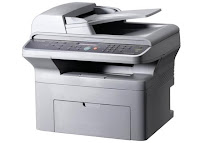
Samsung SCX 4725FN 4 in 1 Multifunction Network Laser Printer


OVERVIEW:  Now days, most of the “all-in-one” printers in stores today don’t have “all” the features of the older generation ones. As printers have gotten smaller and sending scanned documents via e-mail has become acceptable for many businesses, the fax feature has been eliminated.  However, there are still times when you run across a client or a business that will only accept faxed documents. The Samsung SCX-4725FN is a 4-in-1 printer that offers network printing, scanning, copying, and faxing.

PROS:
After a 30 second warm-up, the SCX-4725FN prints and copies at 24 pages per minute, with 10-second delays between print jobs. In operation, the 4-in-1 produces 53dB of sound and 35dB when idle. Think of 53dB as the sound of low conversations and 30 decibels as a quiet office.

The control panel on the SCX-4725FN provides functions for the copier and fax including a programmable phone book list. A pass-through external phone jack on the back of the printer allows for plugging a telephone or an answering machine. If a fax comes in while the copier or printer is in use, 4MB of memory is reserved to store incoming faxes until the copying or printing is complete. For security, incoming faxes can be stored in memory, requiring a 4-digit PIN to print out.

The SCX-4725FN comes standard with a 250-sheet tray, capable of handling up to legal-size paper. The single-sheet multi-purpose tray can handle transparencies, labels, post cards, envelopes, 3” x 5” postcards up to 8½” x 14” legal paper of various bond weights.

At 1200 x 1200 dpi resolution in print mode, the SCX-4725FN keeps text sharp--even at 6-point font sizes--and does a decent job with graphics. To keep from consuming too much toner, the printer has a 600 dpi resolution with a text-enhance or image-enhance switch.  The Toner Save feature allows for a 40% toner life increase while keeping images clear and readable.

The “N” in SCX-4725FN is for “networking”.  Having built-in Ethernet network support and a hi-speed USB, this multifunction is right at home either in the middle of an office floor or connected to a secretary’s computer. The built-in 32MB of printer memory enables the SCX-4725FN to handle printing workloads from multiple computers.

Understanding the printing needs of today’s businesses in providing support for the major software applications, Samsung has installed print emulators that should satisfy the most diverse office. Emulators include PostScript3, HP PCL6 and Samsungs own proprietary print language, SPL.

CONS:
The only downside is the software package seems to skimp on features, especially for Mac OS users. It would be nice if Samsung’s SmartThru4 software expanded its Windows features to Linux and Mac OS systems.

INK / TONER NEEDS:
The monochrome toner that is included is only 50% full, which is something to remember before you decide on copying several hundred pages a shot. Samsung’s so-called “high yield” cartridge has an average yield of 3,000 pages. (No standard-yield cartridge is offered.)

SOFTWARE:
Being a multi-purpose printer, one would expect the software to provide full functions for all the computer platforms Samsung claims it supports.  The software in the CD-ROM is primarily for Windows compatible machines. For Windows users, the SmartThru4 software provides the most features, supporting not only scanning and printing, but offering an advanced printing section that allows for booklet printing, creating a large poster mosaics, and watermarks.

The Linux software package is not included with the CD and has to be downloaded from Samsung’s website to support printer and scanning functions. The Linux Unified Driver Configurator software allows for scanned images to manipulated and edited.  For Macintosh users, the CD-ROM has a couple of basic drivers for printing and a TWAIN driver for scanning. There is no additional software support: you either must have a 3rd party application that manages scanners or use the Mac’s own Image Capture (only available on Mac OS 10.4.7 and higher).

Thursday, April 4, 2013

Samsung ML 2571N Network Laser Printer


OVERVIEW:  Sometimes you just want more. First, you wanted a compact, affordable laser printer; Samsung gave you the ML-2510. Next, you wanted a compact, affordable laser printer with more memory and better resolution; Samsung came up with the ML-2570. Now while it’s nice that a network option is available, you want a compact, affordable, laser printer with more memory, better resolution, and a built-in network.  Samsung said, “You want it, you got it.”    Like the ML-2570, the Samsung ML-2571N offers higher resolutions for sharper B&W prints, more print memory, decent paper capacity, and a compact size. But this printer has network capability built right in, ready for group use in an office or a classroom.

PROS:
This monochrome laser (that’s what the “ML” in ML-2571N stands for), occupies an area just over one square foot on your desk or shelf.

This laser can accept a range of paper weights from 16 to 43# for both paper trays, giving its owner a wider range of paper choices than some other printer brands would allow. However, for manual 2-sided printing (you’re flipping the paper over yourself) use 20-24# weight paper to save yourself some grief.

When you flip open the door on the front of the ML-2571N, it reveals the 250-sheet paper tray. The single-sheet manual feeder is above the main paper tray, for printing labels, cards, and transparencies (and make sure to use transparencies that are “laser printer safe”). The main tray can handle a variety of sizes: from postcard (3” x 5”) to legal (8 ½” x 11”). The ML-2571N’s larger paper and toner capacity makes it ideal for people who rely on printing throughout the day or an office having multiple computers sharing a single printer.

For such an affordable laser printer, the ML-2571N prints extremely fast. After the initial warm-up time, letter-size paper prints at 25 pages per minute, making this one of the fastest of the ML 2000 series.

Having a maximum resolution of 1200 x 1200 dpi, the ML-2571N is great for printing text and B&W photos. The Toner Save feature, only available in it’s 600 x 600 dpi resolution, still produces printouts that are clear and readable.

For small-press desktop publishers using Wintel machines, Samsung’s software CD gives advanced printing features, like booklet printing and large-format poster creation. Sorry Mac and Linux users-- you’ll have to find those features in whatever publishing software you are using to get the same results.
As your business grows, the ML-2571N will still be able to meet your print needs.  With 32MB of non-expandable RAM, the ML-2571N can handle larger print jobs and multiple jobs (if shared or networked with an optional adapter). Understanding the printing needs of today’s businesses and the software applications and suites they often use, Samsung has installed PostScript and PCL6 emulators, as well as their proprietary SPL.

It’s nice that Samsung recognizes there are other operating systems than the one from Redmond. Samsung provides software support for the “Big 3” (Windows, Mac OS, and Linux). Now you don’t have to be chained to one operating system just because your printer can only support one.
Decisions, decisions. With the choice of Parallel, USB, or Ethernet connectivity, no matter how old or new your computer is, the ML-2571N can print from it. The 32MB RAM allows this little laser printer to easily handle being a network printer for an office or a classroom.

CONS:
This is not so much a problem with the printer, just with the printer’s users. One disadvantage to the ML-2571N’s smaller size is many people think it can be wedged anywhere without regard to its ventilation needs. To keep from cooking its internal parts and to prolong the printer’s life I would recommend (1) don’t put the printer where the air-vents are going to be blocked (leave 3” - 4” clearance), and (2) turn the printer off at the end of the day. (Remember what your mother would tell you about turning the lights off when you leave a room?)
In start-up, wake-up, and in operation, the ML-2571N produces 53 dB of sound, and 35dB of noise in standby. Think of 53 decibels as the sound of low conversations and 30 decibels as a quiet office. While 53 decibels may not be loud, it is if the printer is sitting next to you chugging off 50 pages.
The ML-2571N has a 25 second wake-up delay, with a 9s delay between print jobs.  A long delay when you turn on the printer in the morning isn’t a big issue, but the ML-2571N goes automatically into a power-saving sleep mode when it’s inactive. Add all this up and the 25 ppm speed boost is lost with all the delays.

INK / TONER NEEDS:
A big disappointment is the ML-2571N ships with a toner cartridge that’s only 1/3 full. This so-called “starter cartridge” prints about 1000 pages, or 2 reams of paper. So it might be a good idea to go ahead and buy the full yield toner the same time you buy the printer, especially if this is going to be a networked printer.

The ML-2571N will use the same toner cartridge as the ML-2010, with a standard yield of about 3,000 pages, or six reams of paper.
The Samsung does not offer a high-capacity toner for the ML-2571N.

SOFTWARE:
The ML-2571N has one of the better software packages. Not only does it have the basic printing properties for Mac and Linux systems, but for Windows users there’s also an advanced printing section that allows for booklet printing, creating a large poster mosaics, and watermarks.

For a classroom or business that needs a decent network printer without breaking their budget, the Samsung ML-2571N can be a good investment. -- Mel Myers